


Wedding Planner by MyWed
4.4147.00 Reviews
App Specs
- Version
- 5.11.367
- Updated On
- License
- Free
- Downloads
- 1,000,000+
- Developer
- Wedding Planner App
- Categories
- Events
- Platform
- Android, iOS
Screenshots

 Analysis by AppCompare
Wedding planning rarely becomes stressful because of one dramatic decision; it is the pile of small ones that gets hard to manage. I see Wedding Planner by MyWed as most useful when it gives those loose ends a shared place to live: tasks, guests, spending, and partner coordination. It is an events app from Wedding Planner App, and its appeal is practical rather than magical. It can help you keep a plan visible, but it cannot make every vendor responsive or every budget decision easy.
That distinction matters. A planning app is most helpful when you want to replace scattered notes and half-remembered conversations with a routine you can keep up. If you expect it to make choices for you, or to take over the judgment calls that come with a wedding, you may find it less transformative than its all-in-one approach first suggests.
Your Wedding Planning BFF
Imagine having a savvy friend who knows the ins and outs of wedding planning. That's exactly what Wedding Planner by MyWed feels like. From the moment you open it, the app greets you with a clean, intuitive interface that’s as welcoming as a warm hug. It’s like it knows you’re probably stressed and promises to keep things simple.
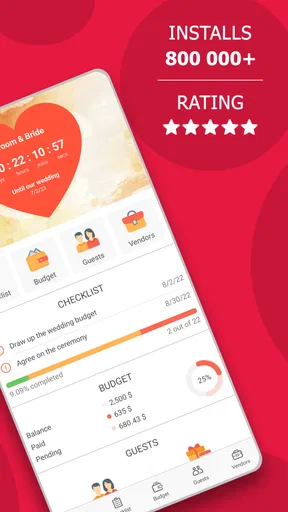
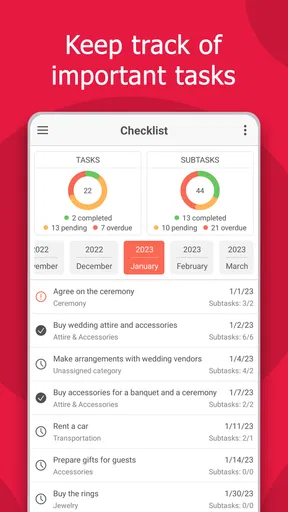
One of the first things I noticed was the seamless setup process. You start by entering your wedding date, and voila, you’re ready to dive into planning mode. The app breaks down the chaos into manageable chunks, giving you a clear timeline of tasks. It’s like having a checklist that doesn’t judge you for procrastinating.
The main practical benefit is not that a task list eliminates work, but that it gives you a place to decide what comes next. I would treat the timeline as a prompt to review priorities, not as an inflexible schedule: venues, suppliers, family decisions, and cultural traditions do not always follow a standard order. If a suggested task does not fit your plans, the useful habit is to adjust your own process rather than let a checklist make the wedding feel behind before it has even begun.
MyWed is free to install, with in-app purchases ranging from $1.49 to $59.99 per item. It has an Everyone content rating, a 4.4 average from around 12,000 ratings, and more than a million installs. It was released on August 13, 2018; version 5.10.365 requires Android 8.0 or later. Those details make it easy to judge whether it fits your phone and expectations, but I would still decide whether the workflow suits you before paying for anything.
All the Features You Need
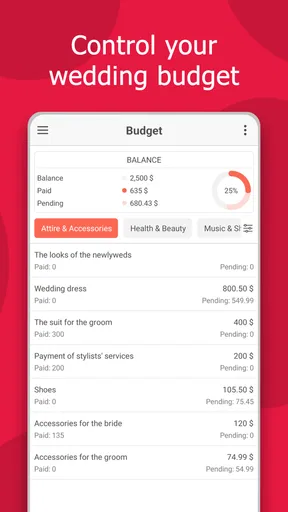
Let’s talk features, because oh boy, does this app pack a punch. Whether you’re a spreadsheet enthusiast or someone who gets hives at the sight of rows and columns, there’s something for everyone. The budget planner was a game-changer for me. It lets you keep track of expenses without losing your mind. You can input your estimated and actual costs, and it even nudges you if you’re going overboard. Talk about a reality check!
Worth Reading Before You Choose

EA SPORTS FC Mobile 26 Is a Bigger Football Game, but It Takes Time

Flipboard Shows What News Apps Must Do Beyond the Feed

Switching to Android Auto Means Rethinking Your Driving Routine

Google Calendar Makes a Crowded Week Easier to Manage

Ludo King Makes the Most of the Minutes Between Plans

Baby Panda World Brings Quick Play to Modern Phones, but Its Game Library Feels Busy
A useful way to get more from a budget tracker is to enter an estimate before asking a supplier for a quote, then record the actual figure once you have it. That makes the gap visible while there is still time to reconsider priorities. I would also keep notes about what each number covers—such as whether a quote includes delivery or setup—because a single total is only helpful when you remember what you compared.
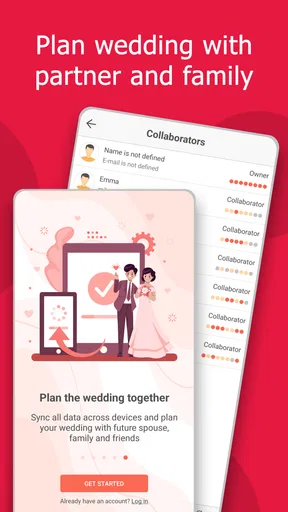
This is where the app’s strength comes with a trade-off: tracking only works if both partners agree to update it. If one person records every deposit and the other keeps receipts in messages, the overview can quickly become misleading. Inviting your partner is therefore more than a convenience; it can support a shared habit. I’d agree on who logs payments and when, rather than assume a shared tool will automatically keep both people in sync.
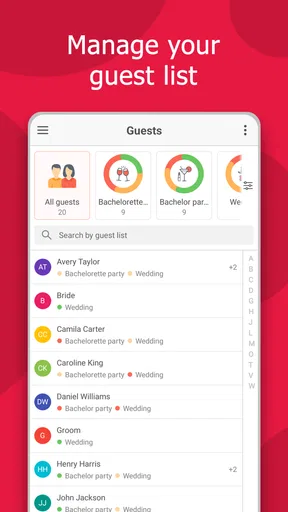
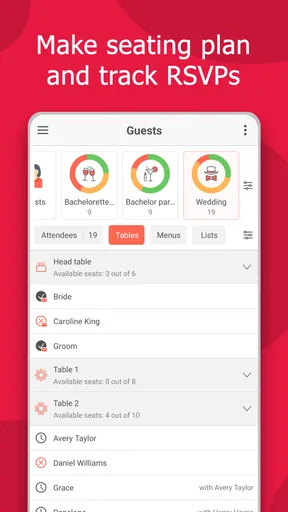
Then there’s the guest list manager. Keeping track of RSVPs, meal preferences, and seating arrangements can become a logistical nightmare. But with this app, it’s almost fun. Okay, maybe not fun, but definitely less painful. You can import contacts directly from your phone, send invites, and even track who’s bringing a plus one.
For a realistic workflow, I would start with a rough guest list before importing contacts. That first pass helps separate people you both intend to invite from names that happen to be in a phone address book. After that, use the list to keep a consistent record of replies and plus-ones instead of treating a sent invitation as a confirmed attendance. This small distinction can prevent a late headcount from being based on guesses.
Guest planning also has social limits no app can solve. A family member may reply through someone else, change plans, or need a conversation before you can mark a decision. I would use the app as the central record after those conversations, while keeping sensitive questions out of a broad group discussion. It is especially useful when two people are managing the list together, but less compelling if a small wedding already fits comfortably on one page of notes.
Vendor Management Made Easy
Now, if you’re like me, the thought of finding and managing vendors might give you a headache. But fear not, this app has your back. It offers a comprehensive vendor directory, complete with reviews and contact details. You can save your favorites and even set reminders for appointments. MyWed ensures you don’t forget to book that all-important cake tasting!
Vendor tools are most valuable when they help you keep track of decisions you have already made or appointments you need to follow up on. I would use reminders for concrete next steps—asking for a revised quote, confirming a meeting, or checking a booking detail—rather than adding vague tasks that will simply create more notifications. A reminder is only useful when it says what action to take and when you can realistically take it.
The directory is not a substitute for checking whether a supplier suits your venue, location, budget, and style. Reviews can help narrow a search, but I would still compare the details of each quote and speak directly with the vendor before committing. For a destination celebration or a less common location, the available choices may feel thinner, so it is sensible to search locally through other channels as well and keep any promising contacts organized in one place.
Speaking of reminders, the app’s notification system is a lifesaver. It gently pokes you when something important is coming up, like booking the florist or confirming the venue. It’s like having a personal assistant who never takes a day off.
There is a balance to strike with notifications. If every possible task becomes urgent, it is easy to tune the alerts out. I would keep reminders tied to deadlines or appointments that could cause a real problem if missed, and review the rest when I sit down to plan. That turns the app into a light-touch prompt instead of another source of pressure during an already busy period.
Design Inspiration Galore
For those of us who get lost in the world of Pinterest boards, the inspiration section is a delightful bonus. You can browse through a myriad of ideas for everything from floral arrangements to unique wedding themes. It’s ideal for when you’re stuck in a creative rut or just need a little visual pick-me-up.
The app also lets you save your favorite ideas, so you can easily reference them later. It’s a handy feature that keeps your vision board organized and your mind clear. Plus, it’s great for sharing with your bridal party when you need a second opinion.
I would use saved inspiration as a decision aid rather than a promise to recreate a picture exactly. A floral image, for instance, can help you explain the mood you like, while a conversation with the florist can establish what fits your season, venue, and budget. Saving a small set of references with a note about what you actually like—color, shape, or overall feel—makes it easier to communicate than sending a large collection of unrelated images.
That approach is also helpful when opinions differ. Ask your partner or wedding party to respond to a short shortlist instead of asking everyone to react to an endless stream of ideas. It keeps the inspiration feature connected to a real decision and avoids turning browsing into another task that never reaches a conclusion.
A Few Things to Keep in Mind
While Wedding Planner by MyWed is pretty fantastic, no app is perfect. I did notice that the app could be a bit sluggish when loading vendor reviews, especially if you’re browsing while multitasking. And while the budget tracker is excellent, it might take a little getting used to if you’re not a numbers person.
Also, if you’re planning a destination wedding, the vendor directory might not be as comprehensive for less common locations. But hey, nobody’s perfect, right?
Overall, though, these are minor hiccups in an otherwise smooth experience. The support team is quick to respond if you have any issues, which is always a plus in my book.
There is also a broader choice to make: do you want one wedding-specific hub, or would separate tools suit you better? A shared notes app and a spreadsheet can be more flexible if you already have a system you trust, and a dedicated spreadsheet may be better for someone who wants custom formulas or detailed financial categories. MyWed is the more natural fit when guests, task reminders, budget tracking, and partner involvement belong together; it is less attractive if you only need one of those pieces or prefer to control every layout yourself.
For a couple juggling work, family input, and supplier calls, a practical routine might be to check the task timeline together once a week, update costs after each payment, and record guest replies as they arrive. That is a modest habit, not a complicated planning method, but it makes the app’s different parts reinforce one another. If only one person uses the app, it can still serve as a personal organizer, though the shared-planning benefit naturally matters less.
One question worth settling early is whether you want a free tool or are comfortable with optional purchases. The app is free, but individual in-app purchases are priced from $1.49 to $59.99. I would begin with the parts that solve an actual problem for you and avoid paying for extras simply because planning feels urgent. A clear list of what you need—guest coordination, expense tracking, or reminders—makes it easier to judge whether an upgrade is worthwhile.
Compatibility is another straightforward consideration: the current Android version requires 8.0 or later. If your phone meets that requirement, the more important question is whether you will keep the records current. Before building your whole plan around any app, I recommend entering a few real tasks and expenses first. If maintaining those entries feels natural, the system is likely to help; if it feels like duplicate admin, a simpler method may suit you better.
Who Will Get the Most from It
I would recommend MyWed most to couples who want one dedicated place to coordinate practical wedding details and are willing to update it together. It is particularly appealing when the guest list is changing, several decisions are in progress at once, or one partner needs a clear view of what has already been handled. The mix of a timeline, expense tracking, and guest management is more useful in that situation than a folder of disconnected screenshots and notes.
It may be less suitable for a very small, uncomplicated ceremony where a short checklist and a few messages are enough. It is also not the best answer for someone who expects a wedding app to replace conversations with family, supplier research, or careful comparison of quotes. If you already have a well-maintained spreadsheet and do not want to move information into another system, staying with that setup may be the lower-friction choice.
My practical test would be simple: after a week, can you quickly see the next important task, what the budget numbers mean, and which guest replies still need attention? If yes, the app is earning its place. If you find yourself copying everything elsewhere or ignoring its reminders, the extra structure may be more work than help. A planning tool should reduce uncertainty, not create a second project about keeping the tool organized.
Final Thoughts
All in all, Wedding Planner by MyWed is like having a wedding guru in your pocket. It’s packed with features that make the entire planning process feel less daunting and much more enjoyable. Whether you’re just starting out or knee-deep in color swatches, this app is a valuable companion.
So, if you’re looking for a way to stay organized and keep your sanity intact, give this app a try. Who knows, it might just be the secret ingredient to the wedding of your dreams.
My recommendation comes with one condition: treat the app as a shared working notebook, not as the authority on how your wedding should run. Its best value is in making details easier to find and follow through on; your priorities and judgment still shape the day. For couples who want that kind of practical structure, MyWed is worth trying. If your plans are simple or your existing system already works, there is no need to add another tool just for the sake of having one.
Pros
- User-friendly interface for easy navigation.
- Comprehensive checklist for wedding tasks.
- Customizable budget planner included.
- Vendor recommendations save time.
- Guest list management is seamless.
Cons
- Limited offline functionality.
- Some features require premium access.
- Ads can be intrusive for free users.
- Occasional app crashes reported.
- Sync issues with third-party calendars.
FAQs for Wedding Planner by MyWed
What features does Wedding Planner by MyWed offer?
Wedding Planner by MyWed offers a comprehensive suite of tools to manage every aspect of your wedding planning. Users can access budget management, a guest list organizer, vendor contacts, and a customizable checklist to ensure no detail is overlooked. Additionally, the app provides inspiration galleries and a timeline planner to keep you on track.
Is Wedding Planner by MyWed free to use?
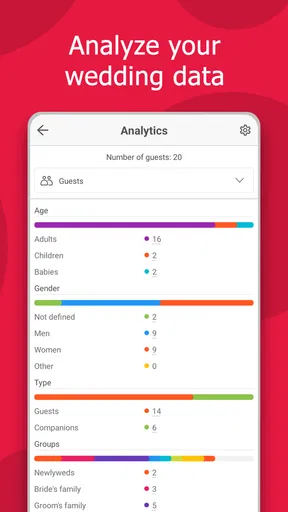
Wedding Planner by MyWed offers a free version with essential features. However, for users looking for more advanced tools and customization options, a premium version is available via in-app purchases. This premium access includes additional templates, advanced analytics, and priority customer support.
How user-friendly is Wedding Planner by MyWed for first-time users?
Wedding Planner by MyWed is designed with an intuitive interface that caters to both tech-savvy users and those new to digital planning. The app includes a helpful tutorial upon installation to guide users through its features, ensuring you can start planning immediately without a steep learning curve.
Can Wedding Planner by MyWed be synchronized across multiple devices?
Yes, Wedding Planner by MyWed supports synchronization across multiple devices. Users can log in with their account on any Android or iOS device, ensuring that their planning data is always up-to-date and accessible, whether they're at home or on the go. This feature is particularly useful for couples planning together.
Does Wedding Planner by MyWed offer customer support?
Wedding Planner by MyWed provides customer support through multiple channels. Users can access a comprehensive FAQ section within the app, or reach out via email for more personalized assistance. Premium users also have access to priority support, ensuring that any questions or issues are addressed promptly.


